Cooling is the data center system that is hardest to correct once the building is finished. Chillers and piping sit inside slabs and ceiling voids that already exist, so a design error turns into demolition and delay. Cooling is essential to keeping data center equipment running reliably. Poor HVAC design can lead to overheating, higher energy costs and costly rework. Once the building is complete, correcting these mistakes becomes more difficult and expensive.
In this article, gbc engineers explores 6 common data center HVAC design mistakes, how to prevent costly rework and what developers should check during design reviews.
Mistake 1: Poor airflow management and inadequate containment
Even with sufficient cooling capacity, data centers can still experience localized overheating when airflow is poorly managed. Without proper separation between hot and cold aisles, hot exhaust air can recirculate into server inlets. At the same time, some of the conditioned air may bypass the IT equipment entirely, reducing overall cooling effectiveness.
These problems often originate from poorly positioned air outlets, unsealed cable openings, missing blanking panels or incomplete aisle containment.
Mistake 2: Prioritizing initial capital costs over total cost of ownership
Budget constraints and competitive procurement often encourage project teams to select HVAC equipment with lower upfront costs. However, when purchasing decisions focus primarily on initial investment without evaluating long-term operating performance, the resulting savings may be outweighed by higher energy and maintenance expenses.
Chillers and pumps may meet the required cooling capacity but consume excessive energy during periods of lower IT demand, particularly if part-load performance has not been properly assessed.
Mistake 3: Inaccurate cooling load calculations and system sizing
Inaccurate cooling load calculations can result in undersized or oversized HVAC systems.
Relying on general floor-area estimates or average rack densities often fails to capture the actual heat generated by servers, networking equipment and supporting electrical infrastructure.
When cooling capacity is too low, server inlet temperatures may rise during peak demand, increasing the risk of thermal throttling and service interruptions. Oversized systems also cost more upfront and may operate inefficiently at low loads.
Read more: What Are the Essential Components of a Data Center Facility?
Mistake 4: Poor MEP coordination across disciplines
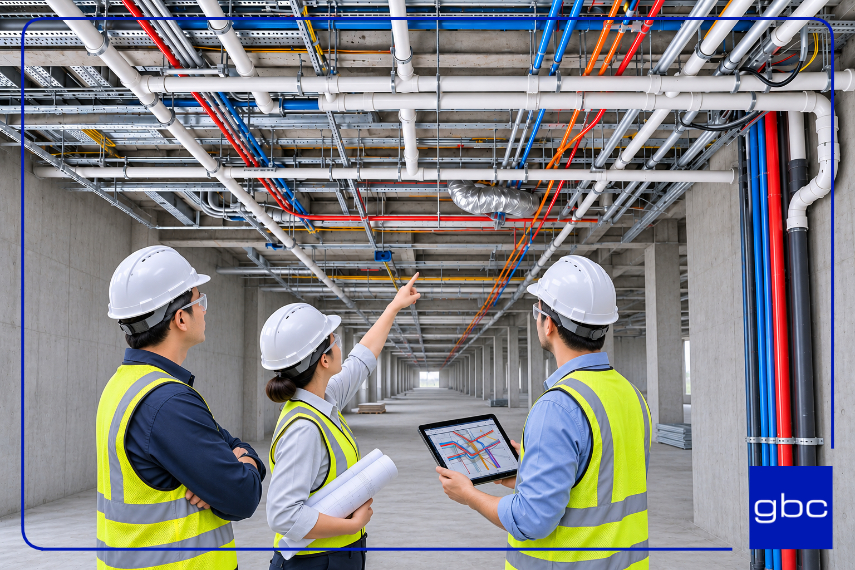
Designing HVAC systems without proper coordination with electrical, structural and fire protection systems can lead to major conflicts. Common issues include chilled-water pipes intersecting cable trays and ductwork clashing with structural beams.
When conflicts are discovered on-site, resolving them may require rerouting pipes and ducts or relocating equipment.
Mistake 5: Overlooking humidity control and airborne contaminants
Inadequate humidity control can increase the risk of condensation, while airborne contaminants can contribute to corrosion. High humidity can also increase corrosion risks in environments with corrosive gases.
Unnecessarily strict humidity limits can also increase energy consumption through excessive humidification and dehumidification.
Mistake 6: Designing for fixed rack densities without future scalability
Cooling infrastructure designed around current rack densities may struggle to accommodate future IT requirements. With growing adoption of AI and GPU-intensive workloads, higher heat concentrations within individual racks are placing greater demands on cooling distribution and heat rejection systems.
As rack densities increase, conventional air cooling may no longer be sufficient. Some high-density racks may require rear-door heat exchangers or direct-to-chip liquid cooling.
Depending on the cooling system, these solutions may require additional piping, coolant distribution units (CDUs), leak detection and heat rejection capacity.
Read more: What Are the Real Challenges to Design a Data Center?
How can HVAC efficiency affect leasable IT capacity?
Cooling uses part of a data center's available power. A more efficient HVAC system can reduce this demand, leaving more power for IT equipment.
For example, consider a data center with a 15 MW power connection. At design load, if total facility power is 1.5 times IT power, the facility can support 10 MW of IT load. At a ratio of 1.2, this increases to 12.5 MW. Actual IT capacity also depends on the electrical and cooling systems.
HVAC efficiency also affects PUE, which measures overall data center energy efficiency. The Uptime Institute's survey reports an industry-wide average annual PUE of 1.52.
How do you prevent rework in data center HVAC design?
|
|
|
|
|
Use CFD simulations, implement aisle containment, and optimize airflow distribution.
|
2. Total cost of ownership
|
Evaluate lifecycle costs, energy efficiency, and part-load performance.
|
3. Cooling load calculations
|
Calculate rack-level heat loads and check cooling capacity for peak demand, redundancy and future expansion.
|
|
|
Use BIM clash detection and verify installation space and maintenance access.
|
5. Humidity and contamination
|
Follow ASHRAE guidelines and assess humidity, filtration, and contamination risks.
|
|
|
Plan modular cooling capacity and reserve space for future liquid-cooling infrastructure.
|
What should developers check during an HVAC design review?
Developers can get clearer answers by reviewing specific design documents rather than relying on general assurances.
|
|
|
What a sound answer shows
|
|
|
Plant efficiency across a range of IT loads
|
Efficiency across the ramp-up years, when the hall is only partly full
|
|
|
Airflow simulation at design load and relevant cooling failure scenarios
|
Rack inlet temperatures inside the ASHRAE recommended range
|
|
|
Current clash log for HVAC, structure, electrical and fire protection
|
No unresolved critical clashes in plant rooms and main routes
|
|
|
Rack-level heat schedule with its assumptions
|
Loads based on planned IT equipment and clear design assumptions
|
|
|
Reserved plant space, riser capacity and connection points
|
Space and routes drawn on the plans before any liquid cooling is installed
|
Read more: The Complete Guide to Data Center Cooling
Conclusion
Avoiding costly rework in data center HVAC design requires more than selecting the right cooling equipment. Accurate load calculations, coordinated MEP design, long-term operating efficiency and future scalability all need to be considered early in the design process.
At gbc engineers, our Technical Services Engineering (MEP and Fire Safety) expertise covers HVAC systems, data center cooling and power distribution design. We use BIM to coordinate with structural and architectural teams, helping identify and resolve design conflicts before construction.
Frequently asked questions
What is PUE in data center HVAC design?
PUE is the ratio of total data center energy consumption to IT equipment energy consumption over the same 12-month period, as defined in ISO/IEC 30134-2.
What is the recommended server inlet temperature?
ASHRAE recommends an air temperature of 18–27°C at the server inlet for equipment classes A1 to A4. The allowable range varies by equipment class, and the manufacturer's specifications should also be checked.
Is hot-aisle or cold-aisle containment better for data center HVAC design?
Hot-aisle containment allows warmer return air, which can improve cooling efficiency. Cold-aisle containment may be easier to retrofit into some existing rooms. The better choice depends on room layout, climate and cooling design.
What is free cooling in data center HVAC design?
Free cooling uses cool outside air or water to remove heat, reducing the need for compressors. Its effectiveness depends on local climate and the cooling system's operating temperatures.
What does N+1 mean in data center cooling?
N is the number of cooling units needed to meet the full heat load. N+1 adds one spare unit so the required cooling capacity can be maintained if one unit is unavailable, provided the rest of the system supports it. 2N duplicates the cooling capacity for greater redundancy.
What is a coolant distribution unit (CDU)?
A CDU transfers heat between the facility water loop and the IT-side coolant loop.
|
About us
gbc engineers
is an international engineering consultancy with offices in Germany, Poland, and South East Asia, having delivered 500+ projects worldwide. We provide services in structural engineering, data center design, infrastructure and bridge engineering, BIM & Scan-to-BIM, and construction management. Combining German engineering quality with international expertise, we achieve sustainable, safe, and efficient solutions for our clients.
|